Easily import songs, record audio and edit channels
If you need to mix two music tracks, or maybe you have a baseline and you would like to add your voice on it, try this easy to use mixer which lets you move, cut andmix all the tracks you need.
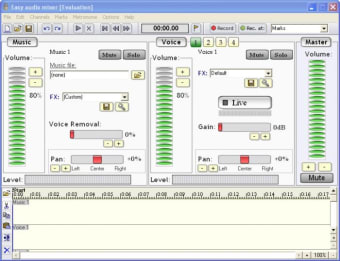
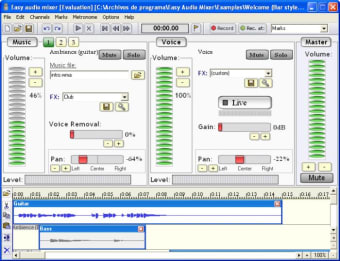
By simply dropping the audio files into the time table display, you will see a wave display of your music, one per channel. Once you have all your files loaded, try to move them in the timeline, to cut and move the bits or to apply radio, add more bass, club sound mode and flanger effects.
If you feel like to sing your favourite song and you wish to record your voice, give it a try with the function provided in Easy audio mixer. Although the application claims to remove voices from any song, so that you can add your voice, it didn't quite work with me. The final effect was just the original song with a lower volume. The program also fails to resize the frame as you need. This can be really annoying when you are working with more than two channels and you need to move tracks on the timetable.
Whether what you need is to mix a song with a base, or you want to sing and add your voice to the original track, give Easy audio mixer a try, although you will soon find some usability issues.
Pros
Easily move, cut and manage tracks on the timetable
Mix and create audio projects, such as podcasts, radio spots, music mixes, presentations and more.
Have a recording studio at your disposal. Mix music, create presentations, podcasts, or record yourself singing. Do this and more with Easy audio mixer !
Easy audio mixer is a multi track editor designed for average users. With it, you will be creating your own audio projects even if you never used a multi track editor or a mixer. If you need to create presentations, podcasts, or even music. This software has all tools to make your work stand over the rest.
Easily import music, record audio, apply effects and edit channels. Once finished, export your project to wave and windows media audio files.
If you are a singer, Easy audio mixer will be really useful to you. Simply import a song, remove the vocals from it, and record yourself singing the song. Plus, various sound effects are included that will help your recording sound professional.
Forget about the hours needed to understand how to use a multi track editor, download Easy audio mixer. Plus, various demonstration videos are included, to get you to master Easy audio mixer in no time.
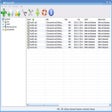
Screenshot Features:
- Simplified interface, designed after professional studio software.
- Import wav/mp3/ogg and wma (windows media audio) files.
- Remove vocals from imported audio files.
- Record audio from your soundcard microphone or line input.
- Apply effects with just one click (multiple effects presets are included).
- Easily edit audio clips.
- Export to wav/wma files that you can play in most music players.
Won't save as complete project.. I figured out how to import music files then tried to underlay some subtle voice tracks but it would never save them both together as ONE single wav or wma file. It would only save the voice file I created with my mic. And even that didn't have the music track I laid with it. I'm glad I tried it out first and didn't purchase. It would have been a waste. Cons: Seriously lacks in instructions for saving the project as a whole instead of bits and pieces.
Anonymous user
Hello . Hai i've tryed this software and payed for the deluex but im having problems with exporting the music i made onto Windows Audio Player! Please tell me why this is not happening
Laws concerning the use of this software vary from country to country. We do not encourage or condone the use of this program if it is in violation of these laws. Softonic may receive a referral fee if you click or buy any of the products featured here.